


You’re scrolling through TikTok when someone shows a dish at a restaurant in London. You watch them take a bite and think: I need to try that.
You’re not going to London next week. You haven’t booked anything. But whenever you do go, this place needs to be part of it.
So you save the video.
Somewhere else on your phone, there’s a screenshot of a bakery in Paris. A hotel you discovered on Instagram. A list of restaurants a friend sent you. Little pieces of future trips, collected whenever something caught your attention.
Then a trip becomes real, and the searching starts. Which video was it? What was the restaurant called? Was the recommendation for the place itself or one particular dish?
The ideas are already there. Getting them into a form you can use is the work.
From Saving a Post to Saving a Place
Bookmarking a video is quick. Turning its recommendations into a trip usually involves several more steps: finding it again, identifying the places, searching for their locations, and recording anything worth remembering.
The ability to extract information from videos, links, and images connects those steps. A recommendation can become a place on a map, with the advice from the original content attached.
That is where Strollio comes in.
Strollio turns recommendations from Instagram Reels, TikTok videos, screenshots, and links into saved places on destination maps. It brings together information about each place, preserves recommendations from the source, and helps you build and update a personalized travel itinerary.
You can start with one restaurant you want to try someday. Later, you can shape your collection into a trip and use it along the way, including with Google Maps.
Save Places While the Recommendation Is in Front of You
When you find a Reel with somewhere you want to visit, share it directly with Strollio:
- Tap the sharing options on the Reel.
- Choose Strollio from the list of apps.
- Select the map where you want to save the places.
- Review the extraction results.
- Choose what to keep.
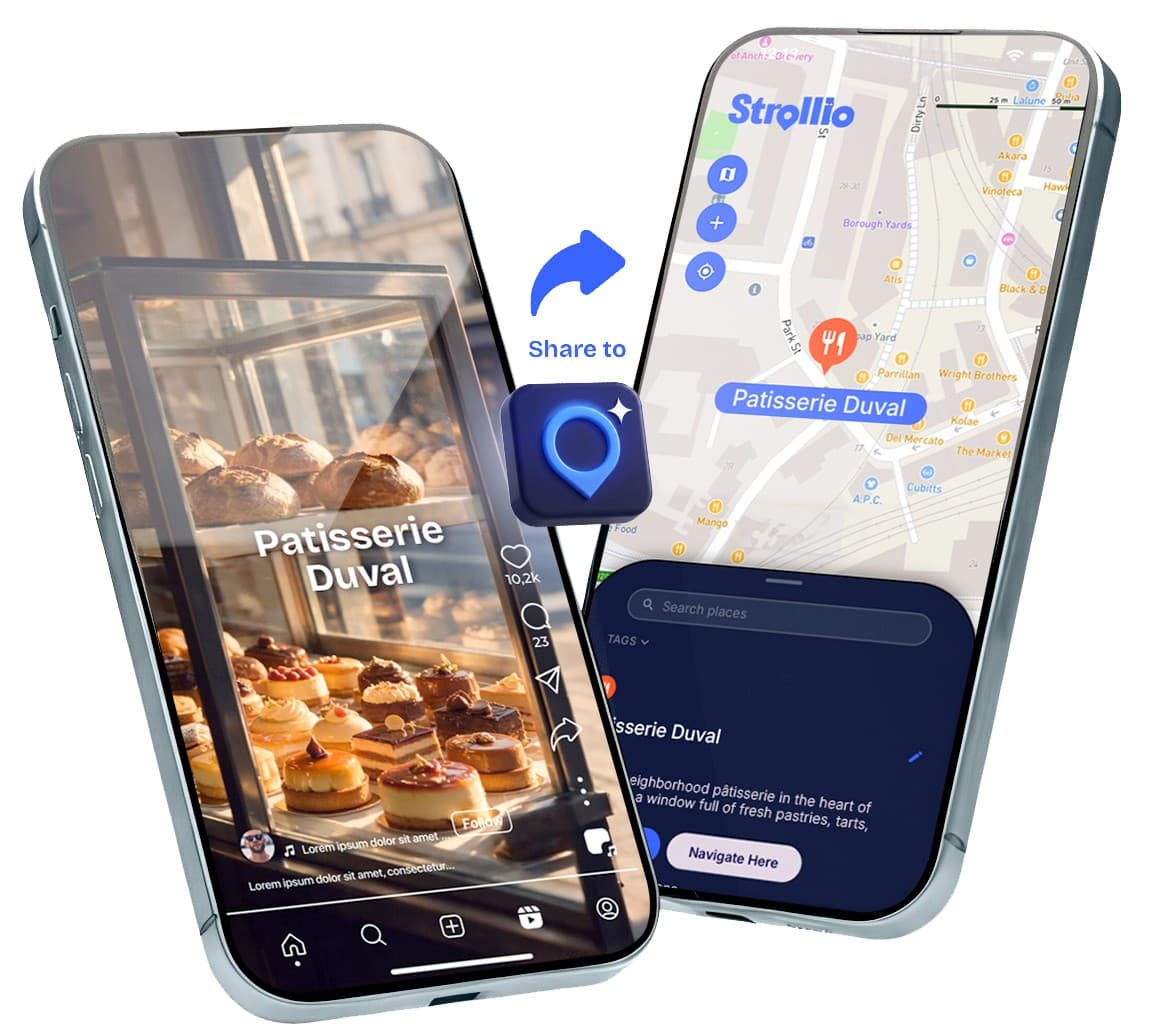
The places you select are saved to your map with expanded information: a description, recommendations extracted from the content, opening hours and a Google rating where available, and a link back to the original Reel.
If the video mentions five restaurants and only two interest you, save those two.
You can share TikTok recommendations in the same way. Places from different videos and sources can come together on one destination map.
Give Your Travel Screenshots Somewhere to Go
A screenshot is often the easiest way to keep something: a restaurant list, a recommendation in a post, or a message with places worth visiting.
But screenshots tend to disappear into the photo library. When you need them, you still have to find the image and turn the information into locations.
Strollio can extract places and recommendations from screenshots, including images you have already saved.
Import a screenshot, review the identified places, and choose which ones belong on your map. They are saved with descriptions and practical information, together with the advice Strollio could extract from the image.
Clear place names and destination details help identify the correct locations. If the screenshot mentions what to order or what is worth seeing, that recommendation can stay with the place.
Keep the Part That Made You Want to Go
You might have saved a restaurant for its noodles, its courtyard, or a recommendation to go early before the queue builds up. Months later, the name alone may not bring that back.
Across its extraction methods, Strollio keeps recommendations from the source content alongside information about the place.
It also brings together relevant information from the web and the place’s own website, summarizing what characterizes it in a few lines. You can edit that information and add your own notes, keeping the original advice and your personal remarks together.
For places extracted from Reels, you can open the original video again.
When you return to your map, you can see what the place is, what interested you there, and anything you wanted to remember, such as “book ahead,” “lunch near the museum,” or “the one Dana recommended.”
You Don’t Need a Trip Booked to Start a Map
Your London map might grow over several months. Meanwhile, you could be collecting bakeries in Paris, hotels in the Alps, and places for a weekend closer to home.
Some collections are for trips you have booked. Others are for destinations you might visit one day.
As a trip gets closer, you can revisit earlier discoveries and start adding places more deliberately. A restaurant you saved six months ago might become the starting point for an evening. Several places in the same neighborhood might suggest a whole afternoon.
By the time you sit down to plan, you already have choices that reflect your interests.
And if you already know your destination and dates, you can start there: gather recommendations, explore places, and build your itinerary as you go.


Turn Your Saved Places into a Flexible Itinerary
Once you know when you are going, Strollio helps organize your collection into a travel itinerary.
Your map might include restaurants from TikTok, a museum from a screenshot, a bakery from Instagram, and places you added yourself.
Strollio helps arrange those choices around practical details such as proximity, opening hours, closed days, and available time. You can refine the plan around your interests and explore additional recommendations to fill gaps.
The itinerary remains something you can work on. Add a new discovery, move a stop, change the order, or rethink a day as your plans develop.
That flexibility continues during the trip. If you decide to spend longer somewhere, discover an event, or change what you feel like doing, you can return to Strollio and adjust the plan.
Your Trip, Your Way - With Strollio and Google Maps
You’ve saved the places that caught your attention and turned them into a plan. Now it’s time to enjoy the trip.
Keep your itinerary in Strollio as you explore, with your saved recommendations and notes close at hand. When you need directions, open Google Maps to navigate to your next stop.
Prefer to have your day’s route in Google Maps? You can export your daily itinerary there. You can also export your places as a KML file to import into Google’s mapping tools.
However you like to travel, your plans stay flexible. Return to Strollio whenever you want to revisit a recommendation, adjust your itinerary, or discover something new along the way.
Find Out What’s Happening While You’re There
A destination changes depending on when you visit.
Alongside the places you have saved, Strollio lets you look for cultural events during your travel dates, from smaller local events to major concerts, shows, and exhibitions.
Add events you want to attend to your itinerary, then follow an external link to buy tickets where available. Ticket purchases take place outside Strollio.
A concert might give an evening its shape. A temporary exhibition might change when you visit a museum. A weekend market could fit between places you already planned to see.
Event coverage varies by destination and date. Confirm schedules, availability, and booking details with the organizer before purchasing tickets.
Ask Questions About a Specific Place
Sometimes you need more information before deciding where a place belongs in your trip.
Strollio’s chat lets you ask questions about individual places in the context of your plans. For example:
- What exhibitions are planned at this museum during my visit?
- What is this restaurant known for?
- What could I do near this place afterward?
You can use the answers to explore options and refine your itinerary, both before leaving and during the trip. Check date-sensitive details with the venue before booking or visiting.
Bring Other People’s Recommendations into the Plan
If you are traveling together, everyone may have their own saved posts and places they want to include.
Shared Strollio maps let you bring recommendations together, add notes, and collaborate on the trip.
You can also explore public maps from creators and other travelers. Where a place links to an original Reel, you can watch the source recommendation from the map.
Public maps open in a browser without installing the app. An account is required to save or edit a map and build on it with your own places.
A shared collection can give you a starting point, with room to make the trip your own.
Pause Your Subscription Between Trips
You may not plan vacations all year, but the places and recommendations you collect can stay useful for years.
Strollio lets you pause your subscription between trips and reactivate it whenever planning becomes relevant again, without losing your saved information. You can still view your saved places and recommendations while your subscription is paused.
When you return to planning, you can pick up where you left off.
A Few Practical Questions
What is Strollio?
Strollio is a travel planning app that turns recommendations from Instagram Reels, TikTok videos, screenshots, and links into saved places on a map. It adds information about each place, keeps the advice from the original content, and helps you build a flexible itinerary that you can adjust before and during your trip.
How do I save places from Instagram Reels to a map?
Share the Reel with Strollio, choose a destination map, and review the extracted places. Select the ones you want to save. They appear on your map with place information, extracted recommendations, and a link back to the original Reel.
Can I save restaurants and attractions from TikTok?
Yes. Share the TikTok video with Strollio, select a map, and review the results before saving the places you want.
Can I extract places from screenshots already on my phone?
Yes. Import existing screenshots into Strollio and review the identified places. Clear names and location details help identify the correct results.
What information is saved with each place?
Strollio brings together information from the content you share, the web, and the place’s own website. Saved places include a short description, practical details such as opening hours and Google ratings where available, and recommendations extracted from the source content. You can edit the information and add your own notes. Places extracted from Reels also link back to the original video.
Do I need travel dates to start?
No. You can collect places for several destinations before choosing dates or booking a trip. If your destination and dates are already decided, you can use Strollio to gather recommendations and start planning right away.
Can I change an itinerary after creating it?
Yes. You can update your itinerary before and during the trip, including adding places, moving stops, and reworking days as your plans change.
Can I use Strollio together with Google Maps?
Yes. You can keep your itinerary and recommendations in Strollio and open Google Maps when you need directions. If you prefer, you can export your daily itinerary to Google Maps or export places as a KML file for import into Google’s mapping tools.
Can I find events during my trip and add them to the itinerary?
Yes. Strollio lets you search for events during your travel dates and add selected events to your itinerary. Where ticket links are available, you can follow them to an external website to purchase.
Can I ask about exhibitions at a particular museum?
Yes. You can use Strollio’s chat to ask questions about a specific place, including exhibitions planned during your travel dates. Confirm current details with the venue before booking.
Can I plan with friends?
Yes. Shared maps and collaborative planning let you collect recommendations, add notes, and work on the trip together.
Can someone view a public map without installing Strollio?
Yes. Public Strollio maps can be opened in a browser. Saving or editing a map requires an account.
Is Strollio free?
Strollio is a paid service, with a limited free allowance to help you explore its features and see whether it suits you before subscribing. Extracting recommendations, bringing together information from multiple sources, and building personalized travel plans require ongoing processing, which the subscription supports.
Can I pause my subscription without losing what I’ve saved?
Yes. You may not plan vacations all year, but the places and recommendations you collect can stay useful for years. Strollio lets you pause your subscription between trips and reactivate it whenever planning becomes relevant again, without losing your saved information. You can still view your saved places and recommendations while your subscription is paused.
What should I check before relying on an extracted recommendation?
Review the identified location, especially when a business has several branches or the name is ambiguous. Extraction depends on the information available in the source. Check important opening hours, event dates, and booking details before visiting.
Start with the Place You Don’t Want to Forget
You don’t need to know when you will get to London to save that restaurant.
Keep the place, keep the recommendation, and add to your map whenever something else catches your attention. When the trip becomes real, you have somewhere to start.
Build a plan, leave room for discoveries, and take it with you in the way that feels most comfortable. You can keep using Strollio throughout the trip, open Google Maps for directions, or take your day’s route there.
And when tomorrow’s plans change, you can change them too.